How to make the Explosion Walk AI video from one photo
By Sendare AI Studio · Updated October 25, 2026
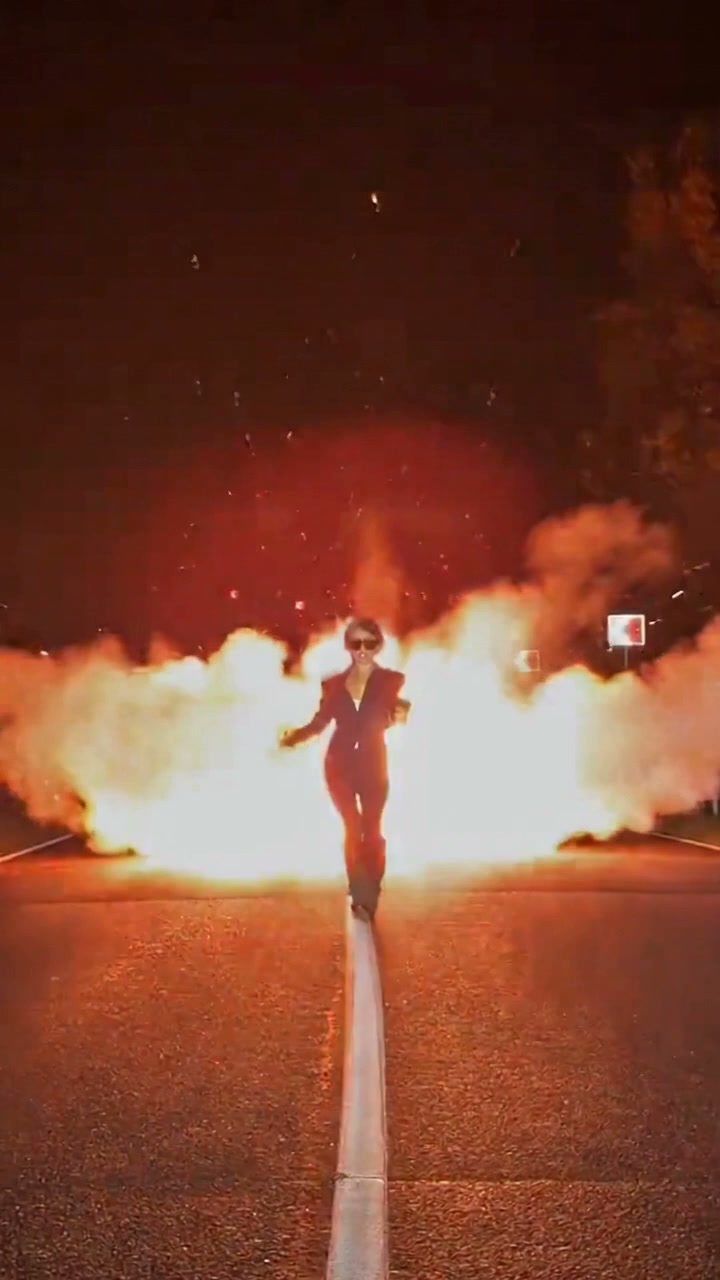
Walking calmly toward the camera while a huge fireball erupts behind you is the ultimate action-movie trope, and in October 2026 @juliakors3's 11-second night-highway reel turned it into one of Instagram and TikTok's biggest AI character-swap trends. Here is how the 5-beat highway sequence works and how to put your own photo in it.
Make your own Explosion Walk video
One photo, 11s 720p MP4 with synced soundtrack, no watermark. From $6.90 one-time.
How do I make the Explosion Walk AI video step by step?
1) Pick a clear, straight-on photo of one adult (or pet) in good light. 2) Upload it on ExplosionWalkAI.com or sendare.co/explosion-walk-ai. 3) Choose the $6.90 Mini Hook Pass (480p) or $9.90 Single Video Pass (720p HD) and click Put me in the video. 4) Download your 11-second 9:16 MP4 with the fireball and synced soundtrack in 4 to 8 minutes.
What audio does the Explosion Walk trend use?
The viral dialogue edit 'You cannot reason with a tiger when your head is in its mouth!' over a heavy bass drop (used in 147,000+ Instagram Reels). Your downloaded MP4 already includes the synced audio track, plus a Silent MP4 option on your order page.
Why does the night highway version keep my face sharper than CapCut filters?
Because you walk forward toward the camera for all 11 seconds while the explosion stays behind you, nothing ever covers your face, and the clip ends on a close-up V-pose right in front of the lens.